

|
|
|
 1st October 2016
|
#1 | ||||
|
محظور
 
|
 Soft Organizer 6.02 Portable
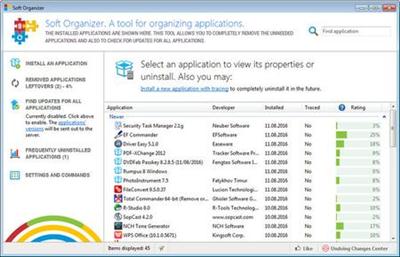 Soft Organizer 6.02 Portable | 11 Mb A common problem we often face with, when uninstalling unnecessary software, is various traces left in the system: unneeded files or folders on a disk, registry entries and so on. This can happen even if an application was removed correctly with its own uninstaller - a special program provided by a vendor to uninstall the application. The Soft Organizer program is intended to solve this problem: It allows you to COMPLETELY uninstall unnecessary applications from your system. Soft Organizer - utility to completely uninstall, search & remove traces when uninstalled, as well as check for new versions of programs. Also has a built-in software rating. Features 1. Very simple and intuitive operation The simple, convenient, and non-overloaded interface doesn't distract a user from the installing and/or uninstalling process. The Soft Organizer utility looks like a simple list of installed programs, where a user merely needs to select a program and click "Uninstall". At the same time, the tool features the entire range of capabilities that even programs with much more complex interfaces have. (Most of those programs look like a space shuttle cockpit with many gauges, meters, and obscure instruments.) 2. Has only the functions you really need Thanks to judicious selection of capabilities, Soft Organizer features only those options you really need in your work. The overall functionality of the program is similar to competitive application removal solutions. 3. Enhanced capabilities for experienced users Due to the number of enhanced functions in Soft Organizer, experienced users can enjoy more precise control over the process. Such functions keep a low profile and do not distract other users, so installing and uninstalling applications using Soft Organizer remains simple and intuitive. Capabilities Search for traces (residues) of the uninstalled program Allows you to remove traces of programs that were not tracked while installing (powered by the Full Uninstall technology). Tracked installation of programs Installs apps and tracks changes in the system to enable removing tracked elements later (powered by the Full Uninstall technology). NEW! Built-in program rating Program rating allows you to evaluate installed applications. The rating is calculated based on the total number of users who have removed this app from the computer shortly after installation. Program description If the purpose of some program in the list looks vague, you can view its description by clicking the special question icon near the program title (not available for all programs). Check for new versions For installed programs there's an option to check for newer versions of a program. This allows you to keep applications up-to-date, as well as to eliminate bugs and problems caused by the outdated versions. Automatic restore points Automatic creation of restore points during the removal of application residues indemnifies the system against any possible emergency. Remove multiple programs at once You can easily remove even multiple applications in Soft Organizer by simply selecting all programs you don't need anymore and clicking "Uninstall". "Silent" program installation For those setup packages that support silent install, you can install applications in the "no questions asked" mode in one click. Export the list of installed programs to HTML When you contact the support staff of a company, they may ask you about the programs installed on your computer. You can easily get such a list in a few clicks. The list is saved as an HTML file that is easy to open and to read. Sorting and grouping of the list The list of programs can be sorted by various parameters (install date, tracking status, title, and others) for instant search for given apps in the list. Program quick search function With quick search, you can find a desired application almost immediately, as long as you know its title or a portion of it. The list dynamically shortens as you type the text in the search box. Agent to detect installer launches The Agent allows you to detect if an installer is launched and initiate installation tracking without manually starting Soft Organizer. Built-in automatic update mechanism Soft Organizer automatically updates to new versions. You don't need to visit the website of the program or download or install the tool manually. You simply click the Update button, and the program does the rest. Home Page -
Recommend Download Link Hight Speed | Please Say Thanks Keep Topic Live
اثبت وجودك
..
|
||||

|

|
|
2nd October 2016
|
#2 |

|
شكراً جزيلاً لموضوعك يا win7dl...
سجل معنا في المنتديان روضة القران و ربيع الفردوس الاعلى ورشح نفسك مشرف الاميل و الماسنجر لاي استفسار alfirdwsiy1433@ymail.com اقدم لكم 15 هدايا ذهبية الاولى كيف تحفظ القران بخاصية التكرار مع برنامج الريال بلاير الرهيب وتوضيح مزاياه الرهيبة مع تحميل القران مقسم ل ايات و سور و ارباع و اجزاء و احزاب و اثمان و صفحات مصحف مرتل و معلم و مجود مع توضيح كيف تبحث في موقع ارشيف عن كل ذالك والثانية خطا شائع عند كثير من الناس في قراءة حفص بل في كل القراءات العشر تسكين الباء في كلمة السبع في قوله تعالى ( وما اكل السبع ) سورة المائدة الاية 3 والصحيح ضمها لان المراد بها هنا حيوان السيع بخلاف السبع المراد بها العدد سبعة فان الباء تسكن كما في سورة المؤمنون الاية 86 - قل من رب السموات السبع ورب العرش العظيم - ولا تنسى قراءاة كتاب اسمه الاخطاء الشائعة في قراءة حفص وهذا رابطه لتحميله https://archive.org/download/3245834...83568/hafs.pdf واسمع اليها في تلاوة عندليب الاسكندرية الخاشع الشيخ شعبان محمود عبد الله السورة رقم 5 المائدة ورقم 23 المؤمنون حيث يقف الشيخ على كلمة السبع في سورة المائدة لتوضيح ضم الباء http://archive.org/details/sha3baan-mahmood-quran والهدية الثالثة لاول مرة من شرائي ومن رفعي رابط ل صفحة ارشيف تجد في اعلاها مصحف الحصري معلم تسجيلات الاذاعة نسخة صوت القاهرة النسخة الاصلية الشرعية لانا معنا اذن من شركة صوت القاهرة بنشر كل مصاحفها بعد شرائه وتجد في نفس الصفحة كيفية الحصول على مصاحف اخرى نسخة صوت القاهرة وحين تفتح لك الصفحة اقرا فيها كيفية الحصول على كل مصاحف صوت القاهرةبجودة رهيبة لا تصدق سي دي اوديو معدل الجودة 1411 ك ب وايضا بجودة رهيبة ام بي ثري معدل الجودة 128 كيلو بايت ايضا تجد في نفس الصفحة رابط ل ملف مضغوط zip فيه روابط ل 696 مصحف مقسمين الى روابط تورنت ومباشرة وجودة فلاك مع الشرح كيف تكفر عن ذنوبك وتكسب ملايين الحسنات عن طريق التورنت مع برنامج تورنت سريع وشرح كيفية عمله مع هدايا اخرى ومفاجات والهدية الرابعة اسطوانة المنشاوي المعلم صوت و صورة نسخة جديدة 2013 نسخة اصلية من شركة رؤية مع مجموعة قيمة جدا من الاسطوانات التي تزيد يوما بعد يوم على نفس الصفحة والهدية الخامسة مصحف المنشاوي المعلم فيديو من قناة سمسم الفضائية والهدية السادسة مصحف المنشاوي المعلم صوتي النسخة الاصلية بجودة رهيبة 128 ك ب والهدية السابعة مصحف القران صوتي لاجمل الاصوات مقسم الى ايات و صفحات و ارباع و اجزاء و اثمان و سور كل مصحف برابط واحد صاروخي يستكمل التحميل الهدية الثامنة من باب الدال على الخير كفاعله انقلوا كل المواضيع الخاصة بالشبكة باسم ربيع الفردوس الاعلى ولا يشترط ان تقولومنقول بل انقلوه باسمائكم الطاهرة المباركة والهدية التاسعة جميع ختمات قناة المجد المرئية بجودة خيالية صوت و كتابة مصحف القران مقسم اجزاء و احزاب اون لاين مباشر الهدية العاشرة اون لاين مباشر جميع تلاوات القران الخاشعة المبكية فيديو الهدية 11 اون لاين مباشر جميع تلاوات القران الخاشعة المبكية اوديو الهدية 12 جميع مصاحف الموبايل الجوال - القران كاملا بحجم صغير جدا و صوت نقي الهدية13 برنامج الموبايل و الجوال صوت و كتابة لكل الاجهزة الجيل الثاني و الثالث و الخامس الهدية14 الموسوعة الصوتية لاجمل السلاسل والاناشيد والدروس و الخطب لمعظم العلماء الهدية 15 الموسوعة المرئية لاجمل الدروس و الخطب |
|
|
|
 |
 |
 |
 |
 |
|
 |
 |
 |
|
|
|
|
|
|
|
|
||||
|
|
|
|
|
|
|














 تقرأ وترحل شارك معنا برد أو بموضوع
 العرض العادي

